Planned official release schedule and content:
Timing:
| Region | Start Date & Time | End Date & Time |
| APAC | Friday 6-Mar-2026, 11:00 am E |
Friday 6-Mar-2026, 5:00 pm EST |
| EMEA | Saturday 7-Mar-2026, 7:00 pm EST | Sunday 8-Mar-2026, 01:00 am EST |
| NAMR | Sunday 8-Mar-2026, 12:00 am EST | Sunday 8-Mar-2026, 06:00 am EST |
What's New
Zoom Phone on Movius VirtualLine - General Availability (US)
Customers can now provision Movius phone numbers for Zoom Phone users, enabling the following communication capabilities:
- Voice calling
- SMS and MMS messaging
This release supports onboarding Zoom Phone users directly into the Movius platform.
Note:
In this phase, the platform supports:
- New Zoom account provisioning
- Migration of existing MultiLine users who already have access to the MultiLine app
Other migration scenarios are not supported in this release
Key Changes
Updated Settings UI
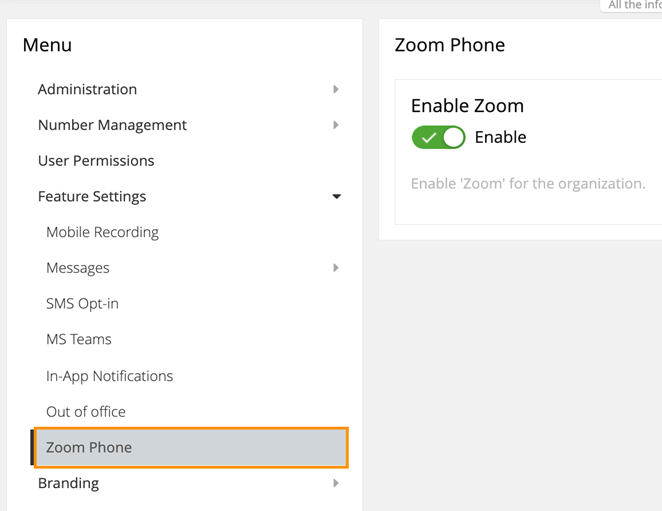
Under Feature Settings, a new section for Zoom Phone will be displayed
Account-Level Toggles
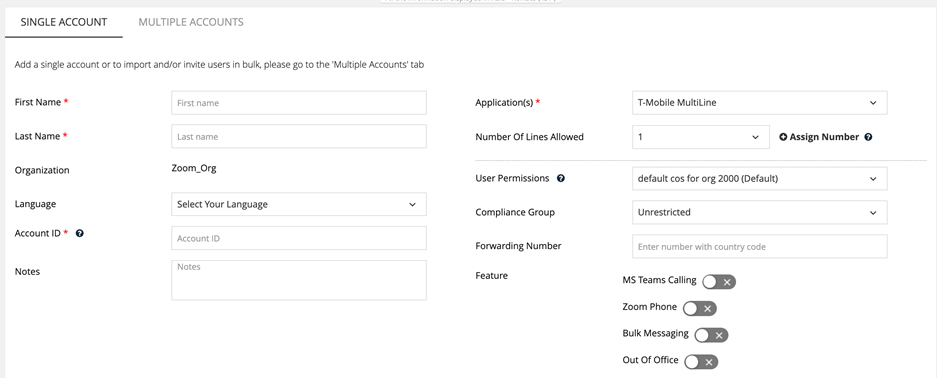
- A Zoom Phone toggle is now available at the account level.
- The toggle is visible only when Zoom Phone is enabled at the organization level.
- Newly provisioned accounts have the Zoom Phone toggle disabled by default.
- Once Zoom Phone is enabled for an account, all other feature controls are automatically disabled.
Provisioning Rules
- The Enable Zoom setting can only be disabled at the organization level if no user accounts currently have Zoom Phone enabled
Bulk Account Import Updates
· A new column, enable_zoom, has been added to the bulk account import Excel template.
· When enable_zoom is set to true, all other feature flags must be disabled
API Updates
Organization API
New organization-level fields have been introduced:
- allow_zoom: Controls whether Zoom features can be enabled for the organization
- enable_zoom: Allows onboarding of organization users with Zoom features
Provisioning API
· A new parameter, enable_zoom, has been added.
· Once enable_zoom is set to true, it cannot be reverted to false using the API.
Zoom Line Onboarding
Customers can onboard Zoom Phone users and numbers into Movius through multiple onboarding paths:
New Zoom Line Activation (No Prior MultiLine)
- Supports onboarding users who are new to Movius
- Zoom lines are provisioned directly into the Movius platform
New Zoom Line Activation (Existing MultiLine Users)
- Allows existing MultiLine users to activate and associate Zoom numbers
- Activation occurs without service disruption
Impact on Existing MultiLine Users
· When existing MultiLine users are enabled with Zoom Phone, the MultiLine app must be version 4.15.
· The MultiLine app will operate in history-only mode, allowing users to view:
- Historical calls
- Messages
- Voicemail
MS Teams (Alloy App) - Enhanced SaaS‑to‑SaaS Audit Logging
The Movius platform now enables SaaS‑to‑SaaS audit logging, activating end‑to‑end audit event delivery for supported clients, including the Teams MultiLine Messaging app. Movius exposes audit events via a standard webhook interface, allowing customers to ingest logs into third‑party security and monitoring platforms. This release enables Microsoft Graph API access events generated by the Teams MultiLine Messaging client.
Key Benefit for You
Customers can now perform comprehensive SaaS‑to‑SaaS audit correlation across Movius, Microsoft 365, and internal security systems, supporting advanced compliance, monitoring, and incident investigation requirements.
MS Teams - Alloy App Platform Support
1. Messaging Performance Improvement
What’s New
The Movius platform will enable significantly improved load times for conversations and messages in the Teams MultiLine Messaging application. This improvement will start reflecting in Version 3.8.0 of the Alloy application after March release.
This enhancement is a key step in the application modernization initiative, resulting in faster:
- Initial load of conversations and messages
- Subsequent navigation and reloads within the app
Scope
- Applicable to Teams MultiLine Messaging v3.7.0
- Not applicable to 2.x.x versions of the application
Customer Benefit
Users experience a more responsive and performant messaging experience, reducing wait times and improving overall usability.
2. Messaging Data Retention (Alloy‑Specific)
What’s New
The Movius platform now supports a dedicated data synchronization and retention configuration specifically for Teams MultiLine Messaging, independent of the MultiLine Mobile application.
Configuration Details
- Retention settings are managed by the Movius delivery team
- The configuration is not exposed to customers
- Existing customer retention periods remain unchanged unless explicitly updated by Movius
Customer Impact
- No impact to existing customers
- No change to current data synchronization behavior
- No customer action required
This enhancement enables greater flexibility for Alloy‑specific messaging policies while preserving backward compatibility.
3. Rebranding: MultiLine Messaging → Alloy
What’s New
The rebranding of MultiLine Messaging to Alloy is now active across the Movius platform.
Visible Changes
- The application name changes from MultiLine Messaging to Alloy
- The MMP Portal reflects the new name for:
- Enabling and disabling applications for users with 'Teams Alloy' toggle
- User and application management workflows

- The change applies to:
- Admin‑managed customer environments
- Customers using self‑service provisioning to enable the Alloy app

Customer Impact
- Branding update only
- No functional or data changes
Defect Resolution
CS-235106 & CS-235083
Issue Summary: There were instances where archival call recordings did not record the regulatory prompt that plays before the conversation begins.
CS-235075
Issue Summary: There were instances where the Movius tab in MS-Teams (Alloy) could not be accessed on a Workspace device.
CS-235074
Issue Summary: In Group Chats containing 2 MML users and at least 1 external guest, if the guest sends an MMS message, that image can only be downloaded by one of the MML users.
CS-235009
Issue Summary: The Detect Native Voicemail feature is not working for AMRWB-enabled numbers.
CS-234996
Issue Summary: In some instances, the timestamp in the message activity API response shows an EST time with UTC time zone suffix.
CS-234992
Issue Summary: There was an instance of a call duration in a CDR shown as negative 1 second (-1).
CS-234989
Issue Summary: There were instances of Movius Connect Teams Calling CDRs showing a status of NOTCONNECTED for connected calls.
CS-234893
Issue Summary: There was an instance of a missing JPEG file in Digital Safe MMS offload.
CS-234558
Issue Summary: There was an issue with a small number of entries missing from the Digital Safe reports related to a Movius database switchover (from primary to standby).
Version History
| Date | Description |
|---|---|
| 02/19/2026 | Created |
